Snapchat
Advertisement
Overview
Snapchat is a popular social media app that allows users to send photos and videos that disappear after being viewed. With fun filters and interactive features, Snapchat is great for staying connected with friends and sharing moments in a unique way.
Get the app
All link sources on this site are jumped to App Store, Google Play and other official platforms. No virus, no malware.
Select a PlatformAdvertisement
Screenshots


Description
Snapchat is a popular multimedia messaging app that has taken the world by storm with its unique features and functionality. Launched in 2011, Snapchat has quickly become one of the most widely used social media platforms, particularly among younger generations.
At its core, Snapchat allows users to send photos and videos to friends and followers that disappear after a set amount of time. This ephemeral nature of the content has made Snapchat stand out from other social media platforms, as it encourages more authentic and in-the-moment interactions.
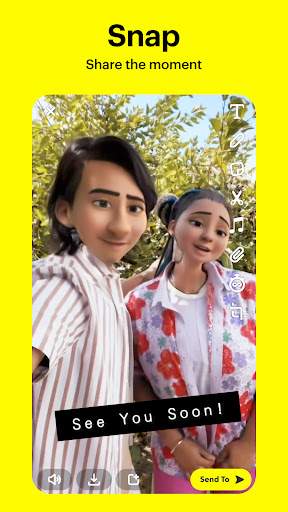
One of the key features that set Snapchat apart is its wide range of filters and lenses that allow users to add fun and creative elements to their photos and videos. From face-altering filters to location-based geofilters, users can easily customize their content to make it more engaging and entertaining.
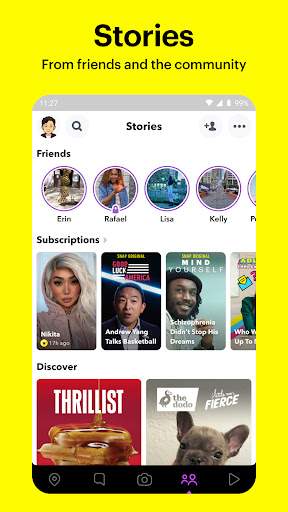
Another popular feature of Snapchat is Stories, which allows users to create a compilation of photos and videos that can be viewed by their friends for 24 hours. This feature has become a staple of the platform, enabling users to share their daily activities and experiences in a more dynamic and interactive way.
Snapchat also offers a Discover section where users can explore content from a variety of publishers, brands, and influencers. From news updates to original shows, Discover provides a curated experience for users to stay informed and entertained within the app.
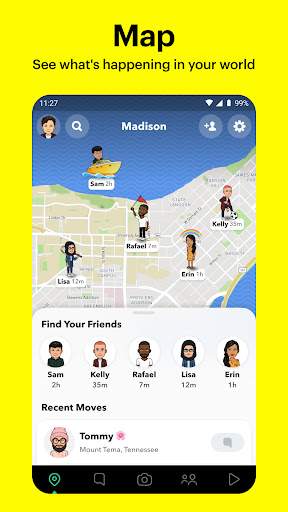
In addition, Snapchat has introduced features such as Snap Map, which allows users to see where their friends are on a map in real-time, and Snap Games, which offers a collection of multiplayer games that can be played within the app.
Privacy and security are top priorities for Snapchat, with features like end-to-end encryption for messages and robust privacy settings to control who can view your content and contact you on the platform.
Over the years, Snapchat has continued to evolve and innovate, introducing new features and tools to enhance the user experience. Whether it's sending a quick photo to a friend, sharing a funny video with your followers, or exploring content from your favorite creators, Snapchat offers a diverse range of ways to connect and express yourself.
With its engaging features, creative tools, and emphasis on authenticity, Snapchat has become a go-to platform for millions of users around the world to communicate, share moments, and stay connected in a fun and interactive way. Whether you're a casual user looking to stay in touch with friends or a content creator seeking to engage with a wider audience, Snapchat offers a dynamic and vibrant space to express yourself and connect with others in a unique and exciting way.
Advertisement
System Compatibility
Snapchat may have compatibility issues with certain devices or versions.
Snapchat is available on both iOS and Android platforms.
Please ensure you have the latest version of the app installed for optimal performance.
Performance may vary based on your device's specifications.
Permission Access
Snapchat requires certain permissions to function properly.
Camera access for taking photos and videos, microphone access for recording audio, location access for geotags, and storage access for saving media.
These permissions are necessary for the core features of the app to work seamlessly.
Update Content
Stay up to date with the latest Snapchat features and improvements.
Recent updates include new AR filters, improved chat functionality, and enhanced privacy settings.
To update Snapchat, go to the App Store (iOS) or Google Play Store (Android) and click on the 'Update' button next to the app.
FAQ
How do I send a snap?
To send a snap on Snapchat, open the app, take a photo or video, add a caption or doodle, and select the recipient to send it to.
How do I view my snaps?
To view your snaps on Snapchat, simply tap on the notification or open the app and swipe right to access your camera roll.
Can I save my snaps?
Yes, you can save your snaps on Snapchat by pressing and holding the snap while viewing it, then tapping the download button.
How do I add filters to my snaps?
To add filters to your snaps on Snapchat, take a photo or video, swipe left or right to choose a filter, then send or save your snap.
Can I chat with friends on Snapchat?
Yes, you can chat with friends on Snapchat by swiping right from the camera screen to access the Friends list, then tapping on a friend's name to start a chat.